

Use it without a cloud meter.
Run local AI as often as you need, without a subscription or paid cloud usage quota. Your device—not a monthly plan—sets the pace.
AAVAHANAM · AI FOR EVERYDAY LIFE
Your work. Your language. Your device.
Everyday AI without another cloud subscription.
Meet Chitta. A private assistant that remembers, codes and turns your information into useful files. A little more patience. A lot more control.
Download ChittaMeet Eagle Communicator. Conversations across languages, with a growing workspace for forms, audits and team decisions.
Join Gamma testing For Gamma testing, enrol and install with the same Google account. Availability depends on testing eligibility.
Use the web app without an installer. To install the PWA, use your browser’s install option where available.
Preview professional workspaces Upcoming 1.2CHOOSE WHERE YOUR AI WORKS
Our mission: AI-based solutions for everyone, without a mandatory cloud AI subscription. Useful intelligence, under your control.
| What matters | Local AI · Chitta | Cloud AI |
|---|---|---|
| Your work | Supported AI tasks run on your device. | Processing usually happens on a provider’s servers. |
| Privacy | Local tasks do not need your files uploaded. | Data handling depends on the provider and settings. |
| Cost & use | No cloud AI subscription or paid usage quota. | Free tiers, subscriptions or usage-based plans vary. |
| Speed | Can be slower; your hardware sets the pace. | Often faster with powerful server hardware. |
| Internet | Setup/model downloads and web searches need internet; supported local tasks then work offline. | Usually needs an internet connection. |
| Control | Your device, your files, your choice. | Available models and limits depend on the service. |
Local does not mean infinite hardware capacity or perfect answers. Model size, memory, battery and available tools matter. Review important work. Web searches contact online sources, separately from local AI processing.
THE PROBLEM WE ARE HERE TO SOLVE
Monthly fees can put useful AI out of reach. Uploading private files is not always an option. Chitta brings the assistant to the phone and PC you already have.
Run local AI as often as you need, without a subscription or paid cloud usage quota. Your device—not a monthly plan—sets the pace.
Local tasks keep your files and useful context on your device. You choose if and when to use online features.
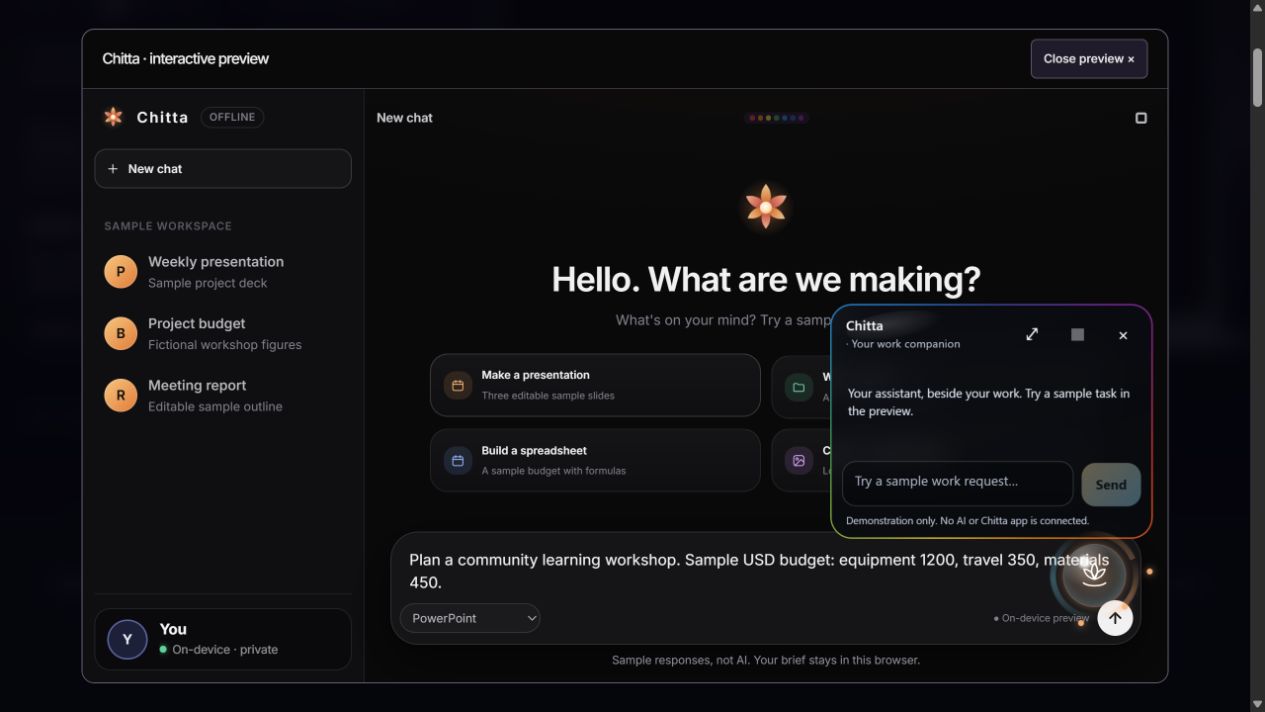
Remember what matters, write code and create PowerPoint presentations, Excel spreadsheets and Word documents from your own information.
Local AI can be slower than powerful cloud systems. Speed, capacity and available features depend on your hardware. Review important results before you use them.
THE AAVAHANAM SOFTWARE WORLD
Chitta makes daily AI private and affordable. Eagle connects people and the work they do together. Vinaya brings AI-based children support and monitoring to the family.
 PRIVATE AI ASSISTANT01
Your daily assistant.
Not another subscription.
Start with your own notes, files and ideas. Chitta remembers useful context, helps you code, and creates presentations, spreadsheets and documents. One assistant brings local AI tools together so you can focus on your work.
Supported local tasks work offline after setup. No paid cloud usage quota; speed and available tools depend on your device. Online features are optional.
Explore Chitta PROFESSIONAL COMMUNICATOR02
Connected people.
Work that moves forward.
Use AI translation on supported Android phones to help understand each other. After the required language models are downloaded, supported text translation can run on the phone. Bring messages, voice and video calls together, wherever your team works. Preview the next step: professional forms, audits, approvals and reports in Eagle 1.2.
Messaging and calls need a connection. Online translation is optional on Android; other platforms and voice features can use online services. Translation can make mistakes—review important meaning.
Join Gamma testing For Gamma testing, enrol and install with the same Google account. Availability depends on testing eligibility.
Preview upcoming professional tools AI-BASED CHILDREN SUPPORT & MONITORING03
Learn first.
Play wisely.
AI-based children support and monitoring for families. Set firm limits on your child’s Android phone and Windows PC, filter websites and apps with automatic categorisation, and turn protected screen time into CBSE study with step-by-step Maths.
EAGLE / PROFESSIONAL COMMUNICATOR
From a conversation to a completed task. Bring forms, quizzes, audits, approvals and reports into the place your team communicates.
Upcoming in Eagle 1.2 Real product screens with sample data. A release preview—not yet in the public downloads.
01 / ASK THE RIGHT QUESTIONS
Keep reusable forms and quizzes in a shared workspace. Add images, files and conditional follow-up questions, so people see what is relevant to their answer.
Public forms and quizzes still require an Eagle account.
02 / TURN CHECKS INTO EVIDENCE
Build image-backed questions and weight answers to reflect what matters. Collect findings, photos or files in a structured response—not a scattered message thread.
Open either screen to inspect the real interface.
03 / PUT THE RIGHT PEOPLE IN ORDER
Choose reviewers and route work through sequential stages in a private group or verified company. Collect an explicit acknowledgement or drawn signature where your process needs one.
Workplace acknowledgements are not certificate-backed digital signatures.
04 / SEE WHAT HAPPENED
Review response totals and results in reporting dashboards. For quizzes, organizers choose whether rankings appear; participants choose whether their names are shown.
Responses, files and signatures are not public by default.
Forms & quizzes · release preview
Still Eagle: chat, people, multilingual communication, learning and games. These screens show the upcoming professional tools, not a live connection to your account.
Get the current releaseEAGLE · AI FOR UNDERSTANDING
AI translation on your phone helps bridge the language gap. Keep the original message beside the translation, so you can review what was said.
Explore Eagle CommunicatorIllustrative conversation, not a live app demo. Review important meaning before you act.
YOUR WORLD. YOUR WORK.
Choose your work to explore an example. These are illustrations, not live app demonstrations.
FOR STUDENTS
Organize notes, explain a topic in simpler words, and prepare questions for practice.
See what Chitta can doSTUDY NOTESMANY SKILLS. ONE SIMPLE EXPERIENCE.
Specialist AI works behind the scenes.
You stay focused on what you want to do.

Vāk Language
Make an idea clear, shape a draft, or explain a topic in everyday language.

Buddhi Choosing tools
Choose the right specialist for your task, without making you pick a model.

Śilpī Code
Develop code, work through problems, and review the results of tests.

Viveka Review
See the checks behind an answer, and understand where your judgment matters.
Names inspired by Sanskrit. Tools built around your needs. Discover Chitta’s approach
WHAT BRINGS US TOGETHER
Good technology creates room for people to learn, understand one another, and do meaningful work.
We build AAVAHANAM around that belief: capable tools, open possibilities, and people at the centre.
MORE ROOM FOR YOUR EVERYDAY WORK
A private assistant on your own device. A conversation across languages.
Start with the help you need.